Turn receipts into reviewed records
Import, check the extracted details and save.
Book Keeps helps Australian sole traders and small businesses organise receipts, expenses and GST records, ready to review and share with their accountant.
Explore three real app demonstrations
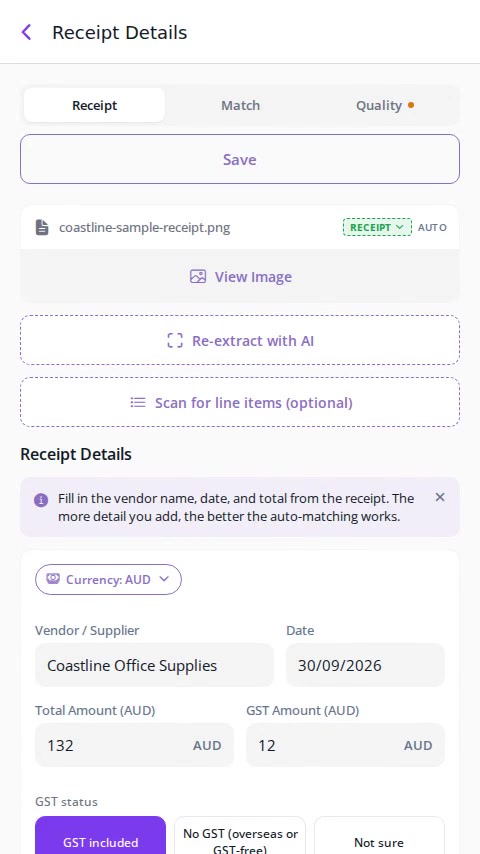
Import, check the extracted details and save.
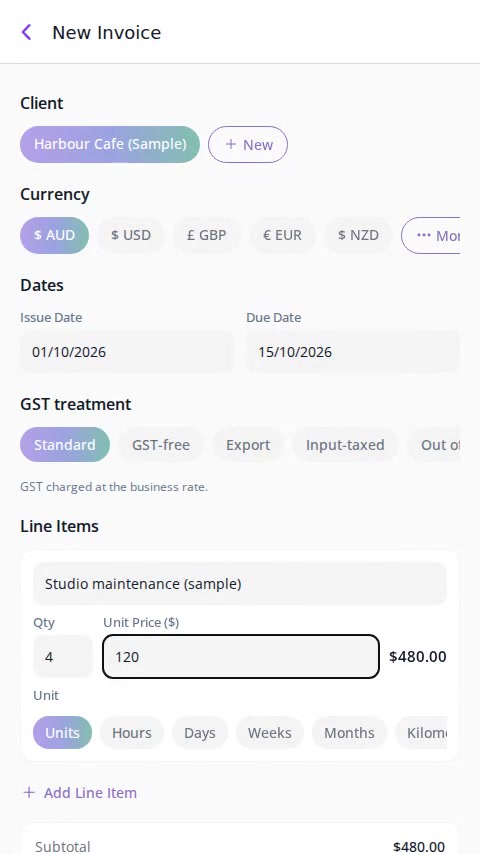
Review the details before sharing with a client.
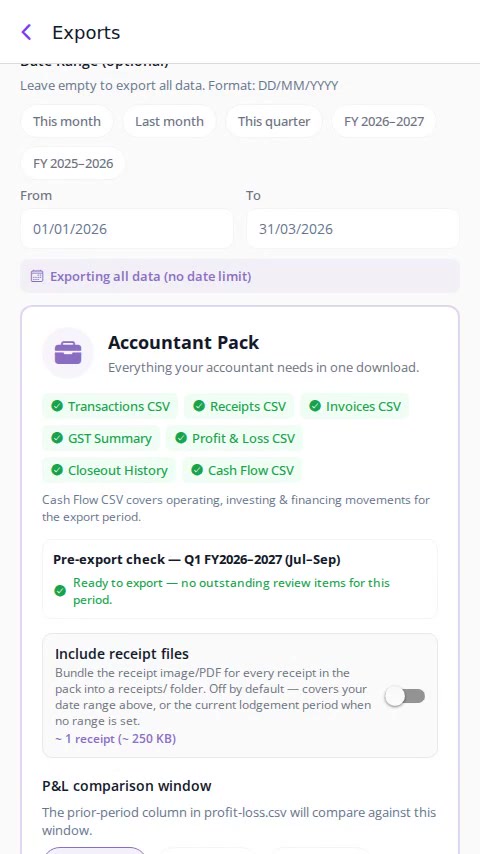
Organise records and export an Accountant Pack.
Real app · Fictional sample data · No sound needed
Follow a receipt from import to a saved record, then see invoicing and accountant preparation. Review and correct the details — you stay in control.
Receipts in different places, transactions waiting to be sorted, reports assembled at the last minute. Book Keeps keeps it organised as you go.
Connect a supported email account for label-based import. Forwarding to your Book Keeps inbox is a separate setup; applying a label does not configure automatic forwarding. Review imported documents and any suggested details or matches before saving your records.
Label-based import · Separately configured forwarding · Review and correct details
No bookkeeping experience needed. Bring your history across from Xero, MYOB, QuickBooks or Rounded with our guided import, or start fresh. Organise, review and share records with your accountant.
Create your free account, then import a CSV bank statement, add transactions by hand, or snap and forward receipts as they come in.
AI suggests receipt details, transaction categories and possible matches. Review and correct the suggestions before saving.
Approve what's been organised, see your income, expenses and GST position, and export what your accountant needs in one click.
The everyday jobs Book Keeps takes off your plate. Explore the full list on the features page.
Capture or import receipts, then review and correct suggested supplier, date, total and GST details before saving and linking records.
Categories are suggested automatically and your patterns are learned over time, you stay in control with a quick review.
See your GST position build through the quarter, with a guided BAS walkthrough when it's time to lodge.
Send professional invoices in any currency, track payment status, and let reminders follow up for you.
Profit & Loss, Balance Sheet and a one-click Accountant Pack export, generated from your real records.
Ask questions in plain English, and let the background agent categorise, match and flag anything that needs your attention.
Bookkeeping that stays out of your way, organised as you go, ready when you need it.
Start free with no credit card, upgrade to one flat price when you're ready, no per-user tricks, no lock-in.
Capture or import receipts and review suggested details, including GST, before saving and sharing records with your accountant.
GST is recorded as you go and organised by BAS period, so there's no deadline scramble.
Receipts, transactions, invoices and reports live together, no more juggling apps and spreadsheets.
Designed for sole traders and small businesses, not accountants, plain language, quick reviews, no jargon.
Your data is encrypted in transit and at rest, never sold, and you can export it any time.
Explore the app through sample-data screenshots, compare software subscriptions, or check for commonly missed deductions. The screenshot gallery is separate from the video demonstration.
Answer 5 quick questions to estimate deductions businesses like yours commonly miss. General information only, not tax advice.
Explore the app: real screenshots with sample Australian business data, no sign-up needed.

The dashboard as it really looks, income against expenses over the last few months, and where the money went.

Review a receipt's supplier, date, total and GST. Check and correct suggested details before saving or linking to a transaction.

Your estimated GST position updates as you go, so there are no surprises when BAS time comes around.

The Overview report shows income against expenses, your profit for the year so far, and how spending in each category is trending, how your business is really doing, at a glance.
Like what you see? Your real data goes here.
Start free with Book KeepsCompare software subscriptions with Book Keeps Pro, not accountant services. Illustrative competitor subscription estimates, not current verified quotes. Plans, promotions, features and tax treatment may differ; check each provider's current price.
Start with 5 receipt scans a month. Upgrade when you need unlimited scans, transactions and invoices.
Currently available to Australian businesses. Pricing shown in Australian dollars (AUD).
Everything you need to get off spreadsheets
Billed annually
Equivalent to A$12.50/month
Save A$29.89 a year compared with monthly billing
Billed monthly
Everything you need to know before getting started.
Yes. Your data is encrypted in transit and at rest, and we never sell or share your personal or financial information for marketing purposes. Data is shared only with the service providers needed to run the app, and AI features only ever use your data with your explicit consent. You can export or delete your data at any time.
Absolutely. Our guided import brings transactions, contacts and historical balances across from Xero, MYOB, QuickBooks or Rounded, or from any bank CSV.
No lock-in, ever. If you cancel your Pro subscription, you keep access until the end of your billing period, then drop back to the Free plan. Your data stays, nothing is deleted.
No bookkeeping experience is needed to organise and review your records. Book Keeps does not replace professional accounting or tax advice. Invite your accountant to review records through the Accountant Dashboard, or share an Accountant Pack export at tax time.
Automatic bank feeds — Coming soon, not available yet. CSV statement import is available now: upload a supported CSV file and review the imported transactions and any duplicate warnings.
Start with 5 free receipt scans each month. No credit card required. Monthly free limits also include 50 transaction imports, 3 invoices, 3 CSV exports and 3 AI assistant queries, with GST tracking and BAS view.
Use the same secure account on the web, iPhone and iPad.
Capture receipts, create invoices and stay organised on the go.
Join the waitlist and we'll tell you when the Android app launches.
Scan with your phone camera to open the mobile download page.